Meta Debugger: A Convenient Chrome Extension for Webpage Debugging
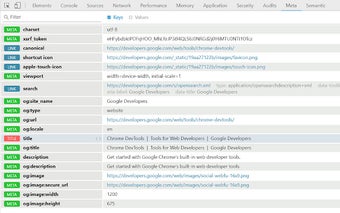
Meta Debugger is a free Chrome extension developed by bluemoehre. This handy tool simplifies the process of debugging the head section of webpages. It focuses on webpage meta data, such as titles, canonicals, Open Graph data, and icons, providing a comfortable way to view and analyze them.
With Meta Debugger, you can easily access all the necessary information in one panel within Chrome DevTools. The extension organizes the data in real time, displaying it in the order it appears in the source code. This allows you to quickly identify any issues or inconsistencies.
To enhance usability, Meta Debugger offers various features. You can filter the results by typing keywords, and multiple arguments can be used by separating them with a comma. Moreover, hovering over a row reveals additional options and actions related to each result.
Should you encounter any bugs while using Meta Debugger, you can report them directly to the developer via Github. Your feedback will contribute to the ongoing improvement of this valuable Chrome extension.
Meta Debugger is an essential tool for web developers and anyone involved in webpage optimization. It streamlines the debugging process, making it more efficient and user-friendly. Get Meta Debugger today and enhance your webpage debugging experience.